

Want to mass unlike all of your TikTok liked videos at once? Unfortunately, TikTok doesn’t natively support bulk unlikes. Our guide will walk you through how to clean up your “Liked” feed efficiently (and safely) using the Redact app.
Over time, most TikTok users accumulate hundreds or even thousands of liked videos – many of which no longer reflect their tastes or public image. These likes don’t just sit quietly: they feed TikTok’s recommendation algorithm, influence what content the platform shows you, and broadcast signals about your preferences (or past curiosity) to anyone who visits your profile.
Plus, there’s a risk in letting your digital footprint spiral unchecked. Just as with published content, your liked videos can reveal patterns, interests, or past associations that you’d rather move past. In extreme cases, generative AI tools can exploit small bits of data (like audio, video thumbnails, or voice clips) to reconstruct or mimic your presence in ways you never intended.
So whether you’re doing some social-media housekeeping, rebranding, or simply exercising greater control over your digital afterlife, this guide will help you bulk delete (or hide) your TikTok likes efficiently while minimizing risks.
Delete All Liked Videos on TikTok with Redact
1. Get Redact
Download the Redact app to your Mac or Windows computer & install the app. Once you open it, you’ll be prompted to create a Redact.dev account using your email address. Redact is password-less & only allows login via email authentication.
Note – TikTok deletion is currently a premium, beta feature & will require a subscription to Redact.
2. Connect your TikTok account
In Redact, click Add Account and search for TikTok.
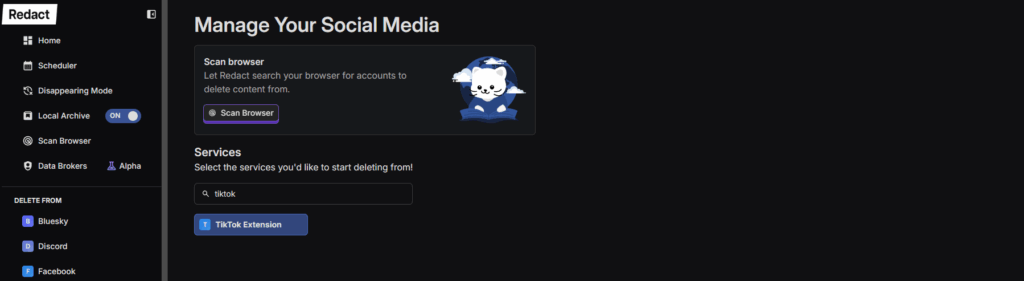
Click Connect TikTok, then login to TikTok like you normally do. Redact doesn’t store your login information or TikTok handle externally – it stays on your device, and gets sent directly to TikTok, like a saved login in a web browser.
Once you’ve connected TikTok, Redact will return you to the form to start deleting.
3. How to mass delete all your TikTok likes
Once your TikTok account is connected, you can start bulk un-liking TikTok videos in just a few clicks.
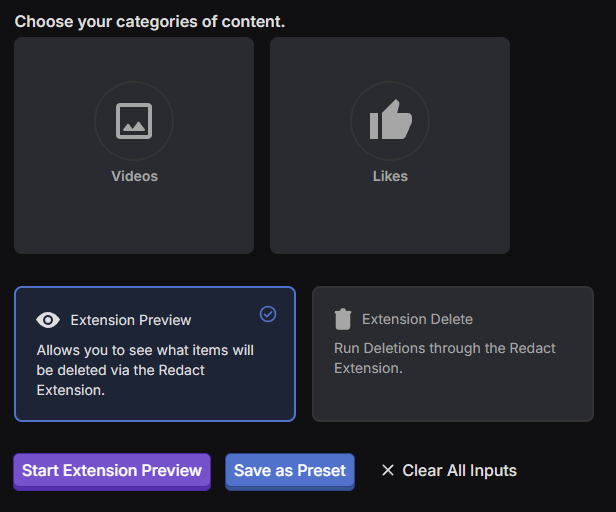
To wipe all your TikTok videos, simply select Likes from the content selector, then run either a Preview or Delete job.
- Extension Preview will show you everything that will be unliked.
- Extension Delete will start un-liking your liked TikTok videos instantly.
Note – you must leave Chrome, and the TikTok tab open while Redact is processing.
That’s it! If you follow these steps, your liked videos on TikTok will be fully cleared out.